How to install:-Don't forget to make a backup
Basic Bathrooms- Download "Bathroom after 2nd Houseupgrade by DevilBro" then override (FarmHouse2.xnb) & (FarmHouse2_marriage.xnb) in the assigned folder, into your Maps folder. - After choosing which version bathroom you want (3 versions to choose from blue, purple and red) then override the farmhouse_tiles.xnb in the assigned folders, into your Content and Maps folder.
Download_1
Download_2
How to install:-Don't forget to make a backup
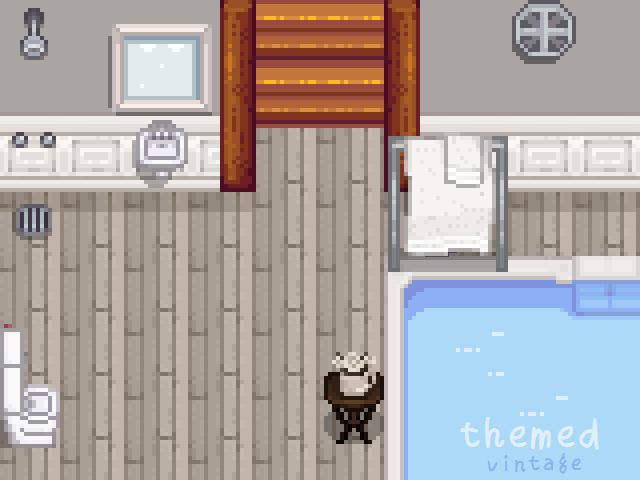
Themed Bathrooms- Download "Bathroom after 2nd Houseupgrade by DevilBro" then override (FarmHouse2.xnb) & (FarmHouse2_marriage.xnb) in the assigned folder, into your Maps folder. - After choosing which version bathroom you want (6 versions to choose from artistic, modern, pink shabby chic, seaside, victorian and vintage) then override the farmhouse_tiles.xnb in the assigned folders, into your Content and Maps folder.
Download_1
Download_2
Installation:1.Install the latest version of SMAPI.2.Unzip the mod folder into Stardew Valley/Mods.3.Run the game using SMAPI.
Download_1
Download_2
Installation:1.Install the latest version of SMAPI.2.Unzip the mod folder into Stardew Valley/Mods.3.Run the game using SMAPI.
Download_1
Download_2
To install:Add the .xnb file you want to use from this download to Stardew Valley\Content\Animals (Remember to rename the .xnb file you choose to cat.xnb). Also it might be a good idea to make a backup of the vanilla cat.xnb file).
Download_1
Download_2
[How to Install]just go to your Stardew Valley content/animals folder:Steam\steamapps\common\Stardew Valley\content\animalsAnd replace the dog.xnb with the downloaded one providedBACK UP THE ORIGINAL DOG by renaming the old one to dog_OLD.xnb or something similar
Download_1
Download_2